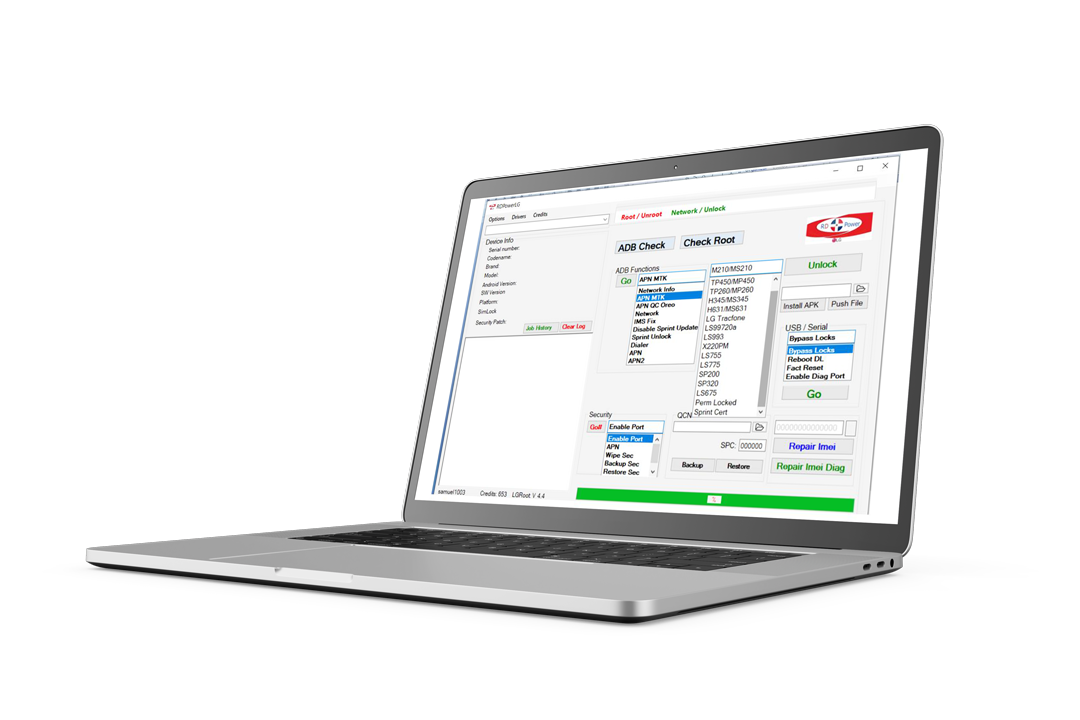
RDPower is the desktop tool used by phone-repair pros worldwide to unlock LG, Motorola, ZTE and more — directly from your shop's PC. Buy a license, top up credits, and start working.
Windows
Native desktop tool
Hardware-bound
One PC per license
Instant credits
Top up & go
Reseller network
Authorized resellers worldwide
What RDPower does
RDPower runs on your Windows PC, talks to the phone over USB, and burns through unlock operations in seconds. No browser, no cloud queue, no waiting on someone else's server farm.
Network & SIM unlocks
Remove carrier locks on supported LG, Motorola, ZTE and Samsung models, plus a long tail of generic Android variants.
FRP / Google account bypass
Reset factory-locked devices and clear forgotten Google accounts on supported models. Direct via USB.
IMEI repair & serial reflash
Repair NULL or invalid IMEIs on devices that support reflashing through the tool.
Bootloader & partition tools
Backup, restore, and modify device partitions on rooted/unlocked devices. Useful for technicians, dangerous in the wrong hands.
Auto updates
New device support shipped through quiet in-tool updates. License keeps working across versions.
Hardware-bound license
Each license binds to your PC. Need to move shops? Reset the hardware ID from your customer account, here on the web.
Download
Install the desktop tool on your shop's PC. Sign in with your customer account, and your license + credits sync automatically.

RDPower for Windows
19.8 · 95 MB
Released 2026-05-13
The official RDPower installer. Includes the device drivers, the unlock engine, and the customer-account client.
Download for Windows 95 MBFirst launch binds the tool to your PC. Move PCs from the customer profile.
System requirements
Need USB drivers?
The installer ships with the most common phone-vendor USB drivers. For older or rare devices, contact your reseller or check the in-tool driver helper.
Signed installer
Verified by Samuel Celular
Auto updates
New device support shipped quietly
Reseller support
Talk to an authorized reseller near you
Authorized resellers
A curated short list of the resellers we'd point a brand-new customer to first. Browse the full network on the dedicated page.
Reseller network coming soon
We're onboarding the first wave of authorized resellers. In the meantime, contact [email protected] for credits and licenses.
How it works
Create account
Sign up here on the web, choose a username, and you start with 10 free credits — enough to try the tool.
Download RDPower
Install the desktop tool on your Windows PC and sign in with the same credentials.
Bind to your PC
On first launch the tool binds to your hardware. License purchases activate on this machine.
Unlock phones
Connect a phone over USB, pick the model, and the tool burns through the unlock. Credits are consumed automatically.
Inside the tool
RDPower's interface stays out of your way. Detect the phone over USB, pick the brand/model, choose the operation. The tool consumes the right amount of credits and writes back the result.
[USB] Detected: LG K22 (LM-K200HM) · SN: 909MPK...
[AUTH] Customer: demo_user · Hardware: bound
[LIC ] RDPowerLG: active · RDPowerPlus: inactive
[BAL ] Credits available: 42.00
────────────────────────────────────────────
[OP ] Operation: Network unlock (LG)
[COST] 0.80 cr
[OK ] Unlock complete — phone restarted.
[BAL ] Credits remaining: 41.20
Frequently asked
Ready to start unlocking
Sign up, download the tool, ask your reseller for credits — you'll be unlocking your first phone within the hour.
Built for technicians worldwide